


Web Landscapes Client guides Buy a domain
Buy a domain in Cloudflare
Your domain is your address on the web, like yourbusiness.com. Buying it in your own Cloudflare account means it's registered in your name, it renews by itself, and you pay what the registry charges, with no markup.
- Time
- 10 to 15 minutes
- You'll need
- Your Cloudflare account, a credit or debit card, your business address
- Cost
- The yearly price shows before you pay
10 steps. Select a number to go straight to it.
What you're buying
- At costCloudflare charges what the registry charges, with no markup, every year.
- Private by defaultYour name, email and address are hidden from public lookups, free.
- Renews by itselfAuto-renew is on from the start, so the name never lapses by accident.
Before you start
- You need your own Cloudflare account. If you don't have one yet, follow Create your Cloudflare account.
- Write down two or three names in order of preference. Good domains are short, easy to spell when you say them out loud, and have no hyphens or numbers. Pick .com first if it's free.
- Make sure the name isn't another company's brand. If you're not sure, ask us before you buy.
- You do this step yourself, so the domain is registered in your name and paid with your card.
- Cloudflare only accepts plain letters in the contact details. Write names and addresses without accents, for example Pena instead of Peña.
Steps
-
Open Registrations, then Buy domain
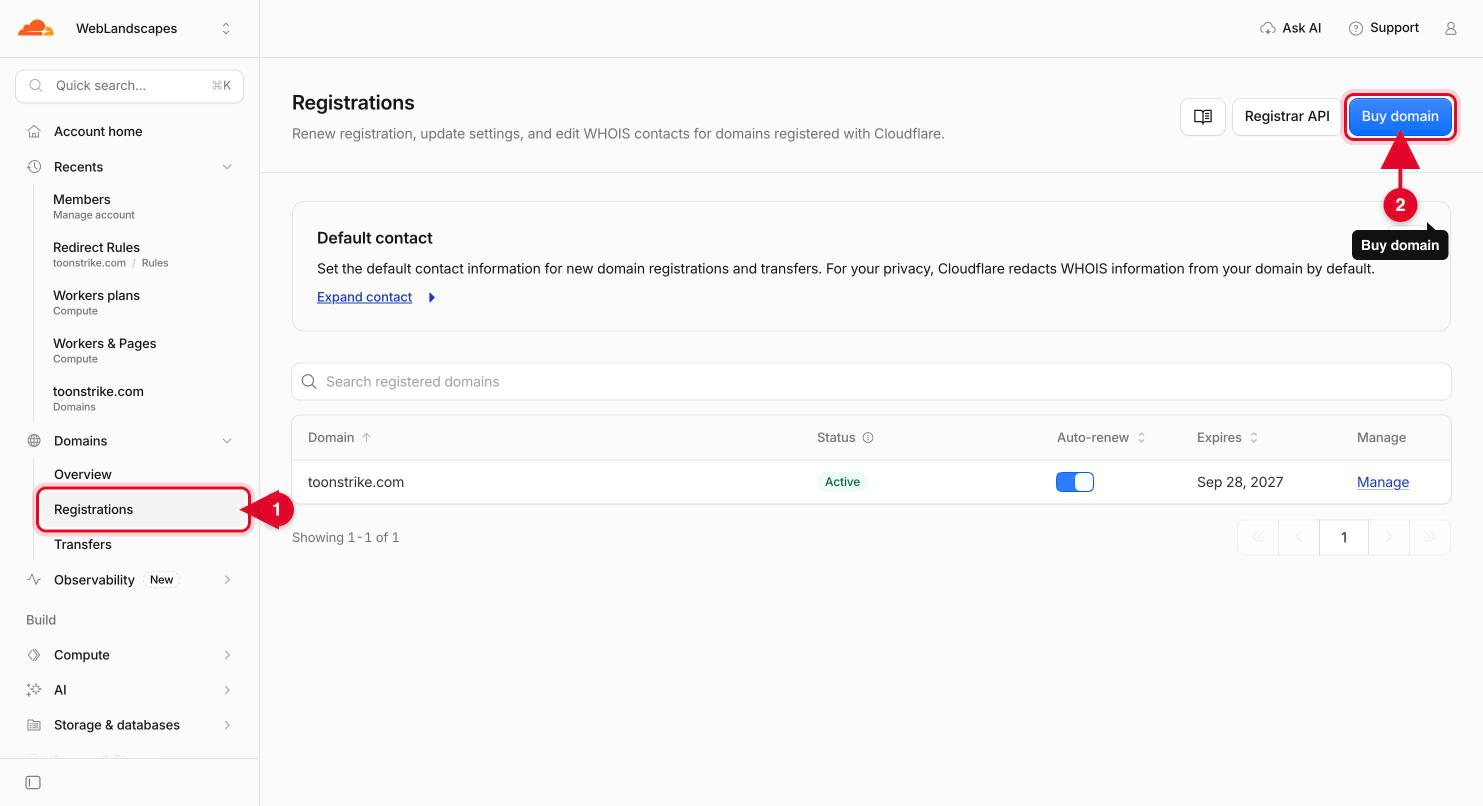
Sign in at dash.cloudflare.com. In the menu on the left, open Domains and select Registrations (number 1). Then select the blue Buy domain button at the top right (number 2).
-
Type the name you want
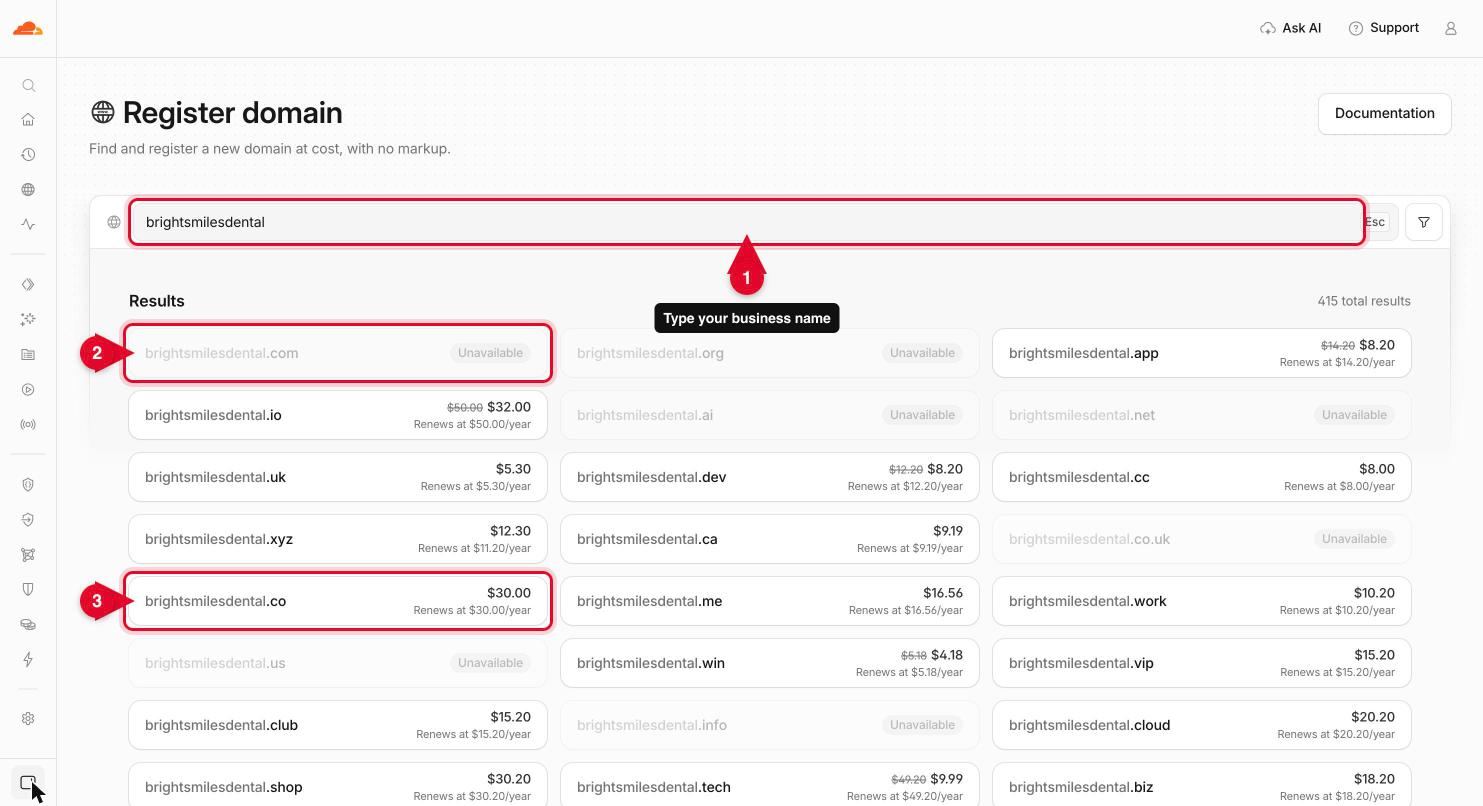
Type your business name in the search box (number 1). Results appear as you type, one line per ending. A gray line marked Unavailable is already taken (number 2). A line with a price is free to buy (number 3).
ImportantSome endings show a lower first-year price with the regular one crossed out. Look at the line under it, Renews at: that's what you'll pay every year after.
-
Select Buy now on the one you want
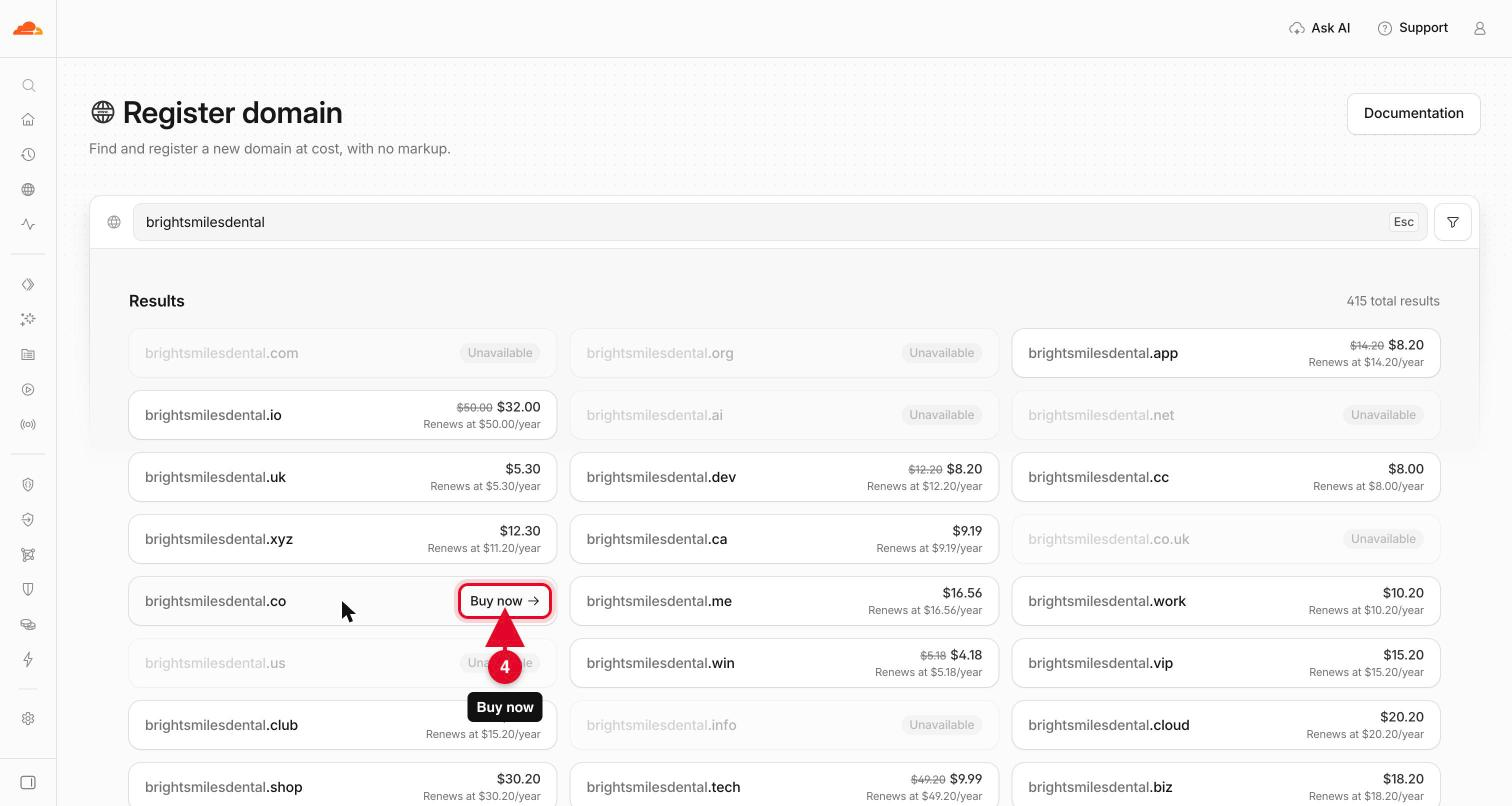
Point at the line you want and select Buy now (number 4). If every ending you like says Unavailable, see If the name is taken.
-
Choose how many years
Buy now opens the checkout. Choose how long to register the name for: one year is fine, because it renews by itself, and you can choose up to 10 years if you'd rather not think about it again.
-
Fill in the registration contact
Enter the owner's first and last name, an email you check, a phone number with the country code (+1 for the US) and the business address. Add the business name under Organization so the domain is clearly the company's.
ImportantThis is the legal owner of the domain, so use your own or your business's details, never ours.
-
Add your payment method
Under Payment option, choose your card. If there's none on file yet, add a credit or debit card. Cloudflare uses it for this purchase and for the yearly renewals.
-
Select Complete purchase
Check the summary: it shows the price, which is Cloudflare's cost with no markup, and what the name renews at. Read the agreement, then select Complete purchase. Registration takes up to 30 seconds. Don't close the page while it runs.
-
Verify the owner's email
The rules for domains (set by ICANN) require you to confirm the owner's email. Open the email Cloudflare sends to the contact address and select the link. Do it within 15 days: if it isn't verified, the domain is put on hold and stops working until you do.
-
Check auto-renew and privacy are on
Go back to Domains, then Registrations, and select Manage next to your new domain. Check that the Auto renew switch is on (number 1), so the domain never lapses. Privacy is on by default (Cloudflare calls it WHOIS redaction): it's free and hides your name, email and address from public lookups. Your state and country still show, by law. You can see it, and your contact details, under Contact (number 2).
 Tip
A few endings don't allow privacy. For example, .us domains must show the owner's details publicly. If that matters to you, choose another ending.
-
Tell us the name
Send us the domain you bought. If we already have access to your account, we take it from there: email, DNS and the website itself.
You'll know it worked when
- The domain appears under Domains, then Registrations, with the status Active.
- You got a receipt from Cloudflare by email.
- You selected the link in the verification email.
- Auto-renew and WHOIS redaction are both on.
If the name is taken
- Try another ending: .co, .net, or one that says what you do, such as .studio, .law or .shop.
- Add a word: your service (yourbusinessplumbing.com), your town, or a verb (getyourbusiness.com, tryyourbusiness.com).
- If the name you want shows a for sale page or a premium price, talk to us before you pay. We can tell you what it's worth and when it expires.
- Our free domain search shows every free ending for a name at once, and names that are about to expire.
If something goes wrong
My card was declined
Check the billing address matches your card, then try again. Some banks block the first charge from a new company: approve it in your bank's app, or use another card.
The ending I want isn't offered
Cloudflare sells most endings, but not all. Tell us the name and we'll tell you where it can be bought and still be run from your Cloudflare account.
The form won't take my name or address
Remove accents and special letters (á, é, ñ, ü), and type the phone number with digits only after the country code.
I already own a domain somewhere else
Don't buy it again. Tell us where it's registered: we'll either move it into your Cloudflare account or point it there, whichever is safer for your email.
Stuck on a step?
Tell us which step and what you see on the screen, and we'll walk you through it. A screenshot helps. Never send us a password or a backup code: we won't ask for one.
Contact@WebLandscapes.com+1 786 608 8489Book a call and do it together
Official help: Register a new domain · WHOIS redaction · Registrar FAQ
Next guideGive Web Landscapes access to your Google Business Profile →