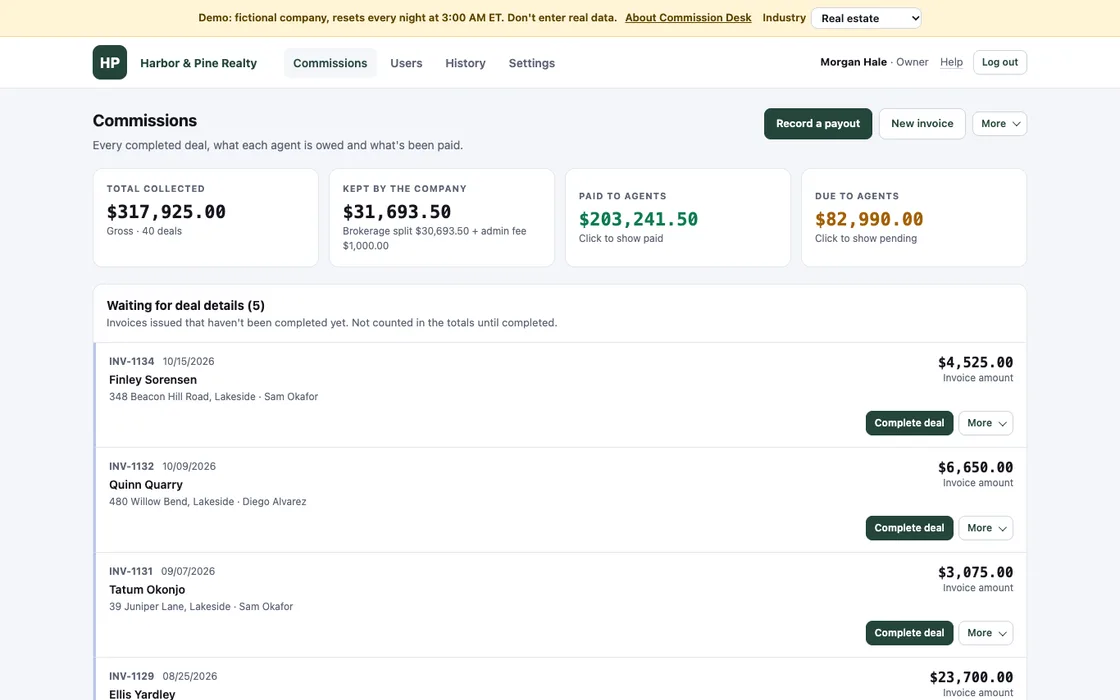
Commission and payout tracking for teams that split earnings
It tracks what each person on your team has earned, what the business keeps and what has been paid out. It runs in a hosting account in your own name, under your logo.
The demo has a made-up company for each of these. Pick one and sign in as the owner, an admin or a team member. It resets every night.
Real estate and rental brokerages
Agents file an invoice when a lease or sale is signed. When it closes, they add the property, the seller, the buyer and who shared the deal. The brokerage keeps each agent's split plus an admin fee per deal, and the rest goes to the agents. Each payout has a check number and a statement for the agent.
Demo: Harbor & Pine Realty, four agents, brokerage split of 8 to 12% and a $25 admin fee
demo-commissions.weblandscapes.com
Salons and spas
Each ticket is a client's visit: a service, retail products or a package. The house keeps its share, which can be different for each stylist. When two stylists work on one client, the ticket is split between them. At the end of the month you pay everyone from one screen and print what each stylist earned.
Demo: Bramblewood Salon & Spa, four stylists, house share of 45 to 55%
demo-commissions.weblandscapes.com
Staffing and recruiting agencies
A placement fee comes in from the client company. The recruiter who found the candidate and the account manager who holds the client split their share, 60/40 or however you agree it, and the agency keeps the rest. Each placement records the position, the client company and the candidate.
Demo: Crestline Staffing Group, permanent, contract and temp-to-hire placements
demo-commissions.weblandscapes.com
Sales teams
Each deal is new business, a renewal or an upsell. The rep earns a percentage of it. When two people close a deal together, such as an account executive and a solutions engineer, they split it. There are no quotas or tiers to set up, so it fits a plan that pays a percentage of what you sell.
Demo: Orbitwell Systems, four reps on 10 to 12%, shared deals split 70/30, 80/20 or 50/50
demo-commissions.weblandscapes.com
What every version does
The words on screen follow your business: agents and deals, stylists and tickets, recruiters and placements, or reps and deals.
An agent's view on a phone. Demo data.
Invoices
Print with your logo and contact details, or save as a PDF. A duplicate invoice or a date far in the future gets a warning before it's saved.
Splitting a job
When a job is done, you record who worked on it and each person's share. Shares must add up to 100%. Before you save, the screen shows the gross, the business's cut, any fee and each person's amount.
Your rule
Set once in Settings: the business keeps a percentage (it can differ per person), plus a flat fee per job if you charge one, and the rest is split. A completed job keeps its numbers, so changing the rule next year doesn't change last year.
Who sees what
The owner and admins see what was collected, what the business kept, what has been paid and what is still owed, per person and per month. Everyone else sees only their own work and their share.
Payouts
Pick the jobs, enter the date and the check number or transfer reference. A payout statement is then ready to print or send.
Year end
A printable earnings summary for each person, and a CSV file with one row per payee and the total paid that tax year, for your 1099 filing service or accountant. It's a data export, not tax advice.
History and sign-in
Every change is recorded with who made it and when. The database is backed up every night and backups are kept for 120 days. People sign in with a password or a passkey (Face ID, Touch ID, Windows Hello). Five wrong passwords lock an account for 15 minutes, and no admin can lock or remove the owner's account.
Your look
Your logo and colors, your currency (12 to choose from) and your number and date style.
Pricing
Setup
Commission Desk in a hosting account in your name, on your own web address, with your logo, colors, wording and commission rule. We bring over the jobs you already track in a spreadsheet and check the totals against it.
from $1,500
Care plan
Support, updates and a check of the backups.
from $79/month
Per person
No per-person fees.
$0
The hosting account is in your name and billed to you directly.
Questions
Where is our data?
In a database in a hosting account in your own name, which you own and log in to. We work in it with access you give us, and you can remove that access at any time.
What happens if we stop working with you?
You keep everything. The app and its nightly backups stay in your account, and the owner can download a full backup or a spreadsheet of every job at any time.
Can it handle our split?
Yes, if the business keeps a percentage, maybe plus a fixed fee, and the rest is shared. Try your own numbers in the demo's Settings. If you pay on tiers, quotas or clawbacks, ask us first.
Our business isn't one of the four
Anyone who splits income by percentage can use it. The four industries only set the starting wording. You change the words, the job types and the rule in Settings.
Do people need to install anything?
No. It's a website that works on phones and computers.
We count visits without cookies and without knowing who you are. May we also remember this browser, so we can see when you come back? No ad trackers, and nothing is sold or shared.We count visits without cookies. May we also remember this browser for return visits? No ad trackers.How it works