


Web Landscapes Guides Outdated search results
Remove outdated results from Google
When an old page about you or your business still shows up in Google, the fix usually starts with the site that published it. This is the method, from the first search to the follow-ups, with the tools Google and Bing give you.
- Time
- About 2 hours to start, then short checks for about 60 days
- You'll need
- A list of the searches that show the page, and an email address you check every day
- The result
- Fewer outdated pages on the first page of results for your name, and a log of every request and answer
How it works
Google shows what websites publish. To get a page out of the results for good, the site that hosts it has to change it: hide it from search engines, remove your name, or take it down. Once the page changes, Google and Bing have tools that speed up the update.
This guide is for outdated or unwanted pages: an old news item, a business listing with old details, a forum post, a record of something long resolved. It isn't legal advice. If a page is false and damaging, or you're in a dispute, talk to a lawyer before you write to anyone.
- Do the sections in order. The "before" searches are what you'll compare against later.
- Keep a log from day one: a simple table with the date, the site, what you sent and what came back.
- Words in bold are the exact words you'll see on the screen.
Before you start
- An email address you check every day. Every request and follow-up goes from this one address, so the whole conversation stays in one place.
- A folder for screenshots, named by date.
- A log: a spreadsheet or a document with the columns date, site, page address, what you asked, how you sent it, and the answer.
- Decide how you want to be named if a site offers to edit the page instead of hiding it: your initials, or a neutral description. Write it at the top of the log and stick to it in every message.
Search before you change anything
Open a private window
Open a private (incognito) browser window and don't sign in to Google. Results in your normal window are shaped by your own history and look different from what other people see.
Search every way people might search you
Search each version of your name in quotes: full name, with a middle name or initial, a short name, the business name, and any other words that bring up the page. For a business, also search the business name with the town or the trade.
After each search, add
&pws=0to the end of the address in the address bar and press Enter. It asks Google for results that aren't personalized. If people in another country search for you, repeat the searches on that country's Google (for example google.ca or google.co.uk).Take screenshots of page 1
Take screenshots of the whole first page of results for each search. Name each one by date and search, for example
2026-11-09 full name.png. These are your "before" pictures.You'll know it worked whenevery search has a screenshot, and your log has a table with each search, the position of each unwanted result, and the site it's on.
Make the list of pages
Write down each page and what to ask
For every unwanted result, open the page and copy its exact address. Then decide what to ask the site, in this order:
- Noindex. The page stays on their site, but search engines stop showing it. This is the request sites agree to most often, because nothing is deleted.
- Edit the page. Replace your name with initials or a neutral label, or correct old details.
- Take it down. Only when the page is clearly outdated or the site's own policy allows it.
Read the site's policy first
Many publishers have a page about removal or correction requests, often linked in the footer as "Contact", "Corrections" or "Privacy". If they have a form or a specific address for these requests, use it. It gets your request to the right person.
Mark the pages you can't change
Official court and government websites keep their records, and some publishers only act on a court order. Note these in the log. You'll deal with them by pushing them down (see What can't be removed).
Write and send the requests
Write one short message per site
Keep it polite and brief:
- Who you are, and that the page is about you or your business.
- The exact page address.
- What you ask: noindex first, and say plainly that you aren't asking them to delete anything.
- One or two sentences on why: the matter is old and resolved, it's a private person, the details are out of date.
- Your name and how to reach you.
TipDon't argue about what the page says, and don't mention other people involved. A calm, short request is the one that gets read.
Send it
Send each message on the same day if you can, so your follow-up dates line up. By email, keep a copy in your sent folder. By web form, take a screenshot of the filled form before you send it and of the confirmation after. Some sites only accept a letter by post; if so, use a service with tracking.
You'll know it worked whenevery site on your list has a line in the log with the date, how you sent it and any reference number.
Answer replies the same day
Reply in the same email thread, so the history stays together. Save a screenshot of each reply. If a site asks for more information, give only what's needed to identify the page and show it's about you.
Follow up
Count from the day each request went out. Only follow up with sites that haven't answered.
- Day 7: reply in the same thread with "Follow-up" added to the subject. Two lines: the page and what you asked.
- Day 14: a second and last follow-up, the same way.
- After that, stop writing. Note it in the log and move the page to What can't be removed.
Check the site really did it
A "yes" by email isn't enough. Check the page itself.
Open the page source
Open the page in Chrome. Then open the source: View > Developer > View Source on a Mac, or press Ctrl+U on Windows (Option+Command+U on a Mac).
Look for the noindex line
Press Ctrl+F (Command+F on a Mac) and search for
robots. You're looking for a line like<meta name="robots" content="noindex">. It may have more words, likenoindex, nofollow. If it saysindex, follow, the page can still show in Google.If the page now says it can't be found, the site took it down. That counts too.
ImportantA site can also send noindex in a way the page source doesn't show (in the server's response headers). If a site says it applied noindex and you can't find the line, ask them to confirm how they did it before you assume it failed.
Ask Google to refresh the result
Google only drops or updates a result when it visits the page again, which can take weeks. Its Refresh Outdated Content tool speeds this up, but only in two cases: the page is gone, or words in Google's result are no longer on the page.
Open the tool and start a request
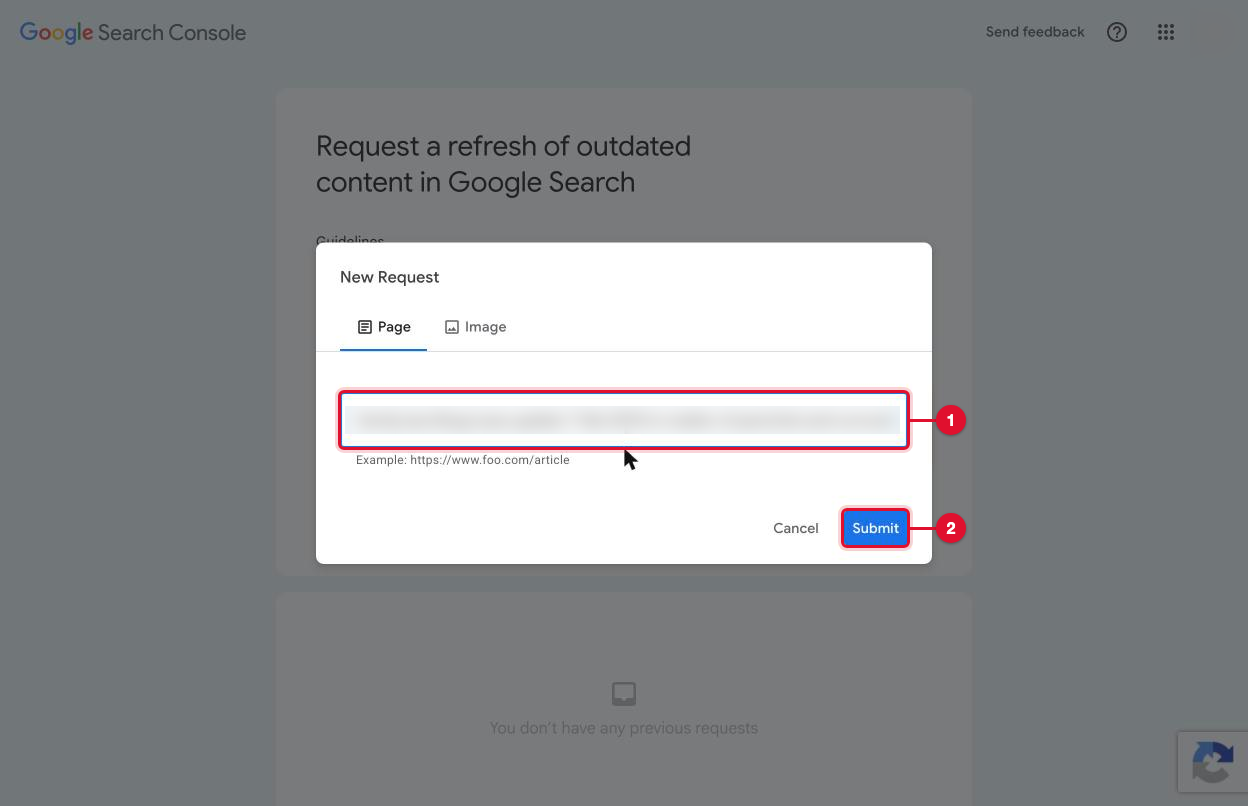
Go to search.google.com/search-console/remove-outdated-content and sign in with any Google account. You don't need to own the site. Select New request.
Paste the page address and submit
Paste the exact address (number 1) and select Submit (number 2).
If the page is gone
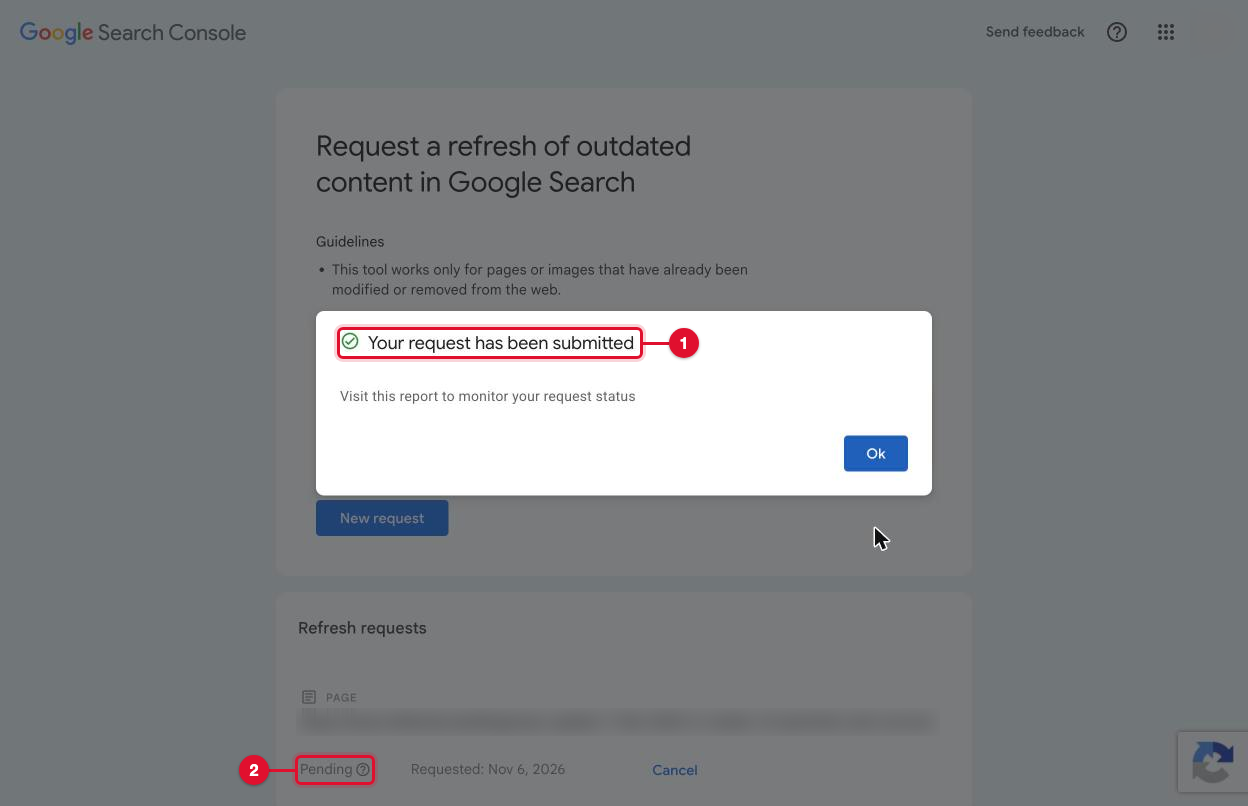
Google says Your request has been submitted (number 1) and lists it as Pending (number 2). Save a screenshot and log it.
If the page still exists
Google says This page still exists (number 1) and asks for a word that appears in Google's result but is no longer on the live page (number 2).
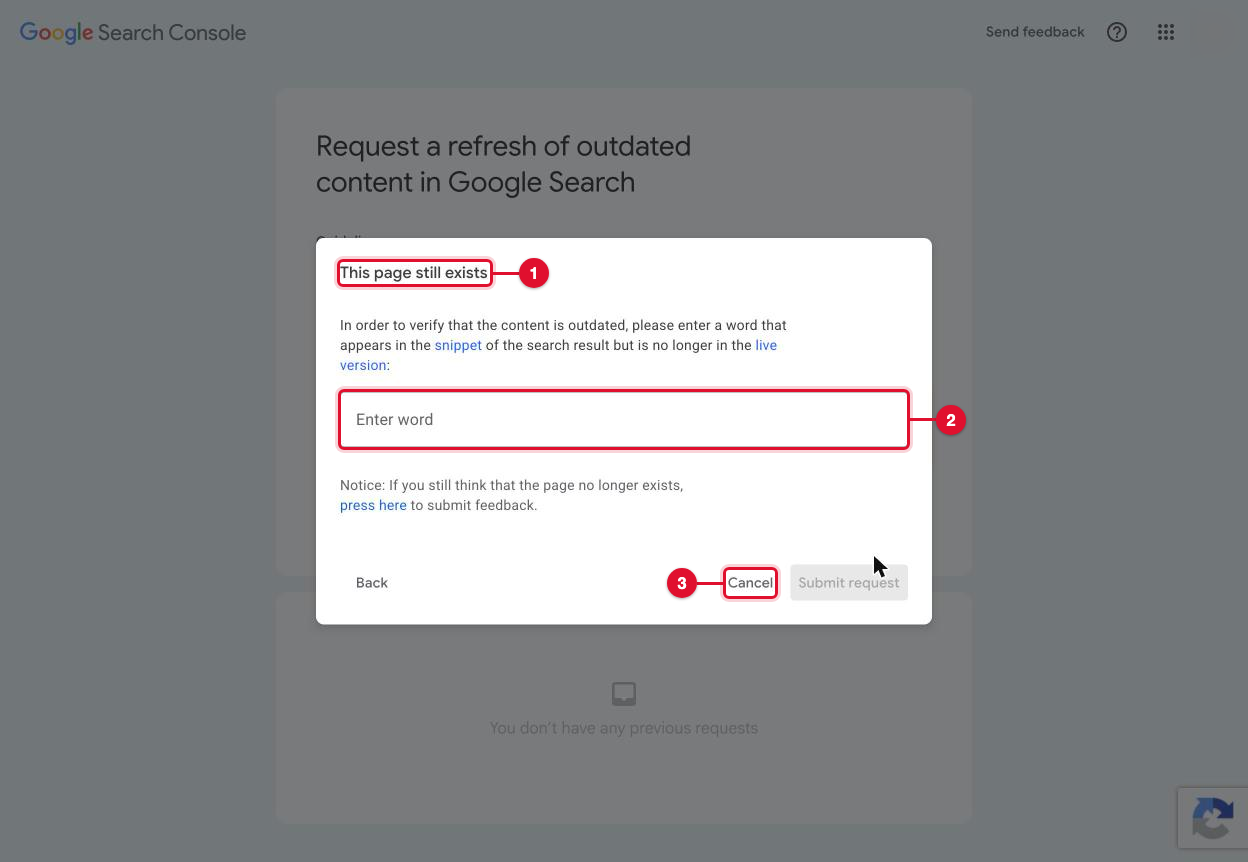
- If the site removed your name or changed the text, open the live page, press Ctrl+F and check the word really isn't there any more. Then type that one word and submit.
- If the site only added noindex, the text didn't change, so there is no such word. Select Cancel (number 3). Google drops a noindex page on its next visit; the tool doesn't apply.
ImportantNever type a word that is still on the page, and never invent one. A false request is refused, and it doesn't speed anything up.
Do the same in Bing
Bing has its own Content Removal Tool. Sign in, paste the page address and send the request. Use it the same way: for pages that are gone or whose text changed.
Remove personal details from Google
Some things Google will remove from its results even while the page stays online: your home address, phone number or personal email shown next to your name, government ID numbers, bank or card numbers, signatures, medical records and passwords.
Use Results about you
Signed in to your Google account, go to Google's Results about you page. It finds results that show your contact details, lets you ask for their removal, and can tell you when new ones appear. For other personal information, open Google's help page below and select Start removal request.
You'll know it worked wheneach request shows in Results about you with its status. Google removes the result from Search; the page itself stays on the site until the site changes it.
Search again on day 14, 30 and 60
Repeat the "before" searches exactly: the same versions of your name, the same countries, a private window, &pws=0 at the end. Save the screenshots in a folder with the new date, and update the log: what moved down, what's gone, and anything new.
On day 60, put the "before" and "after" screenshots side by side for each search. That shows what changed and what's left.
What can't be removed
- Official court and government records stay published. Write to them only if their own website offers a process.
- Sites that only act on a court order. Ask once, politely, and log their answer. Whether a court order is possible or worth it is a question for a lawyer.
- Pages that are accurate and in the public interest, such as recent news, are unlikely to come down.
For these, the way forward is pushing them down with good pages about you that rank above them: your own website with your full name on it, an up-to-date Google Business Profile, professional profiles, and articles or interviews. Most people never look past the first page, so five or six strong pages of your own can move an old result off it.
A site with your own name as the domain, kept current, is the page Google is most likely to show first for your name.
If something goes wrong
A site doesn't answer after the second follow-up
Stop following up. Log it, and treat the page as one you can push down. Sending more messages rarely helps and can look like pressure.
A site says no
Thank them once, log the answer and the date, and move the page to What can't be removed.
A site asks for ID or a court order
Send only what's needed to show the page is about you. Don't send a copy of your ID unless it's a site you trust and their policy asks for it. A request for a court order is a question for a lawyer.
The page still shows in Google after day 30, but the noindex line is there
That's normal. Google can take weeks to visit the page again. Check the line is still there and look again on day 60.
The noindex line disappeared
The site may have changed its pages or its design. Write in the same thread, ask again, and log it.
Google's refresh tool says the request was denied
The page still has the words, or it isn't really gone. Check the page, log it, and don't send it again until the page changes.
Printable checklist
Tick each box as you go. The PDF has the same list on paper.
Want us to do it for you?
We can do this for you: the searches, the list of sites, the requests, the follow-ups, the page checks and Google's refresh requests, with a short report at each check. Tell us which searches worry you and we'll say what's realistic before you pay anything.
Official help
Web Landscapes is not affiliated with, sponsored or endorsed by Google or Microsoft. Product names and logos are trademarks of their owners, used here only to describe their products.
Next guideTake payments with Stripe or PayPal →